
Filter Bookmarks
The Bookmark feature lets schools create and save custom filters in EnrolHQ. Staff save any frequently used filter under Bookmarks and apply it by clicking a button. Only one Bookmark filter applies at a time.
Create a bookmark
The standard selectors (Campus, Year of Entry, Calendar Year of Entry) are always available.
The Show More button reveals additional filters by category.
All enrolment journey statuses customised for the school are available for selection.

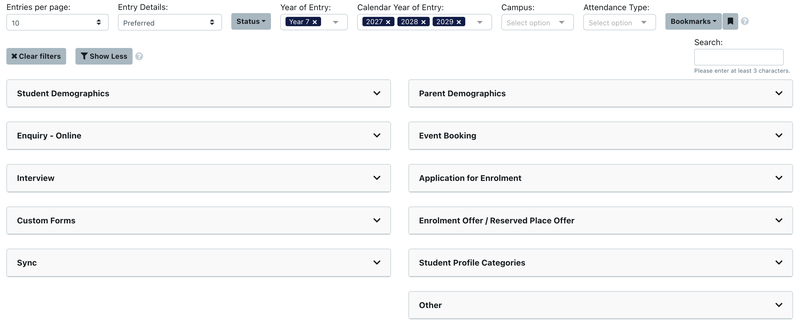
To create a bookmark:
- Select a filter combination
- Click the bookmark icon
- Name the bookmark. The filters save under Bookmarks for next time

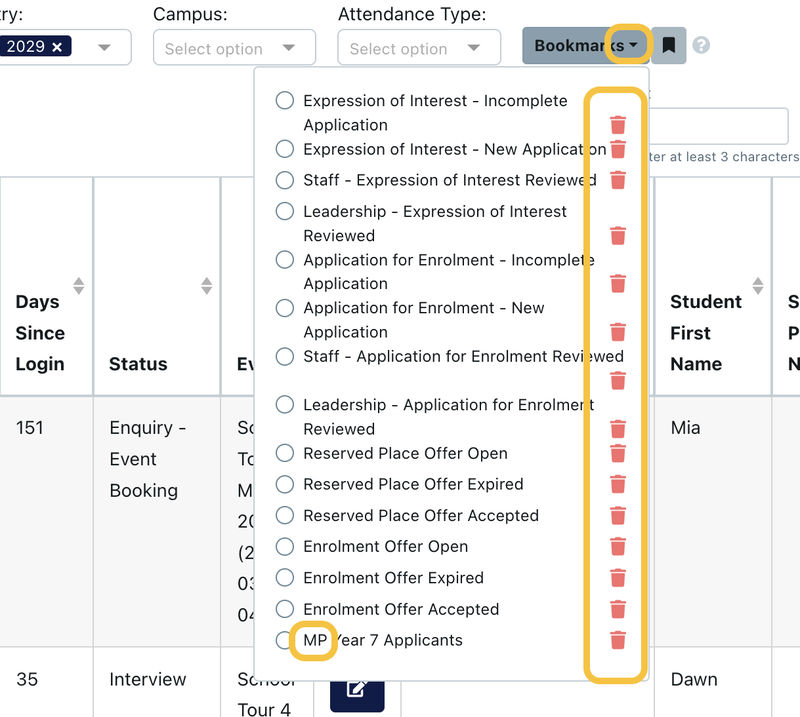
Delete a bookmark
All bookmarks are shared, not user-specific. Deleting a bookmark removes it for every staff member.
As a workaround, add initials to the start of a bookmark name to identify who created it to prevent deletion of another user's bookmark.
Last reviewed: